




Let me be brutally honest: as a small business owner, I've bought into more hyped "time-saving" tech tools than I can count. Spoiler: most end up gathering digital dust. But after a late-night rabbit hole comparing AI assistants for my online business, Perplexity AI stuck—not just for the shiny features, but because it's become my daily silent partner. Here’s a (sometimes messy, always honest) look at what Perplexity AI can do for folks like us—right down to saving your bacon when a customer asks how your eco-friendly beans are sourced, and you’re three hours into tax prep. Buckle up, this isn’t your usual AI poster-child review.
Perplexity AI Overview in the Real World
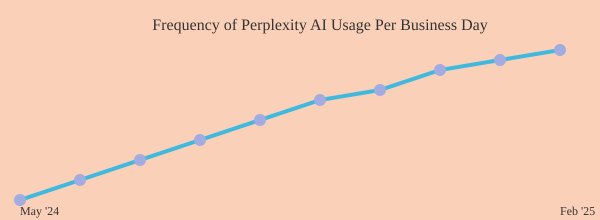
If there’s one question I get more than any other, it’s this: “What AI tool do you actually use yourself most often?” My answer is always the same. Perplexity AI. I use Perplexity every single day, multiple times per day. For small business operations, it’s become my unexpected Swiss Army knife for efficiency.
At first glance, Perplexity’s interface looks almost too simple—a single prompt box and a few drop-downs. But dig a little deeper and you’ll find a robust AI search engine packed with features and capabilities that go far beyond basic queries. The modes are where the magic happens: Auto, Deep Research, Pro Search, and Reasoning (R1/O3 Mini). I mostly stick to Auto and Deep Research, but each mode is tailored for different productivity needs.
What truly distinguishes Perplexity is its ability to simplify and streamline the research process. Instead of endless links, it delivers concise, sourced answers. For example, just this morning, I used Deep Research Mode to fact-check some news claims—all while juggling emails. That kind of real-time, multi-source synthesis is a game changer for small business operations.
The platform’s features and capabilities extend to file uploads (PDFs, images), academic and social media search toggles, and even a Discover tab for daily news digests. Spaces let you organize projects with custom instructions and model selection, while Pages allow you to build internal wikis—perfect for storing company knowledge.
On mobile, Perplexity shines with camera and voice query options. I can snap a photo of a document, ask a question, and get an answer in seconds. Whether I’m organizing supplier details, fact-checking, or briefing staff, Perplexity’s productivity AI tools keep me ahead.
I use Perplexity every single day, multiple times per day.
Deep Research Mode and Advanced Features: Streamlining the Small Biz Hustle
If you run a small business, you know how quickly information overload can hit. That’s where Perplexity AI’s Deep Research Mode and advanced features have become my unexpected Swiss Army knife for efficiency. I used to spend hours comparing point-of-sale providers, buried in spreadsheets and browser tabs. Now, with Deep Research Mode, I get a detailed, organized report in under 10 minutes—no more spreadsheet-induced headaches. It scours dozens of sources, weighs pros and cons, and even lets me export the findings as a PDF for later review. As one user put it:
The deep research feature is...something I would typically export as a PDF and then go and read more into it later probably.
But it doesn’t stop there. Document upload and analysis is a lifesaver for small business operations. I’ve fed supplier PDFs, menu drafts, and even policy docs into Perplexity. Within seconds, I get summaries, key details, or even instant translations—no more hunting through dense files. The platform supports a variety of file types, including PDFs and images up to 25MB (with more generous limits on the Pro plan).
During busy rushes, I’ve relied on Perplexity’s voice mode. Picture this: I’m handling espresso shots and need a quick answer—no time to type. I just ask out loud and get instant, accurate responses. The mobile camera integration is also handy for snapping a document and getting a summary on the spot.
For organizing supplier threads, customer Q&A, or marketing notes, Spaces keep everything tidy and easy to find. Research shows that Deep Research Mode can replace hours of manual comparison or compliance checks for SMBs, while file analysis makes operational docs digestible on the fly—vital for small teams.
Feature | Details |
|---|---|
Deep Research Mode | Unlimited for Pro, 5 queries/day for free users |
File Support | PDFs/images up to 25MB for analysis/chat |
AI Models | GPT-4.5, Claude 3.7 Sonnet, Perplexity Sonar (Llama), Grok 2, Gemini 2.0 Flash |
Real-Time Web Search, Bookings, and Customer Care: Where the Magic Happens
Running a small business means juggling a thousand questions—sometimes all before you’ve even opened your doors. I remember one morning when a customer called early. Thanks to Perplexity’s real-time information retrieval, I had the answer in under 30 seconds. No frantic Googling, no guessing—just accurate, up-to-date info, right when I needed it. This is where an AI-powered search engine truly shines.
Perplexity’s specialized search modes are a game changer. The ‘Focus’ feature lets me narrow results to trusted sources—Reddit for honest peer reviews, YouTube for how-to videos, or PubMed for health and food safety. For businesses like restaurants, clinics, or salons, this means you can quickly verify details or compliance, all from a single dashboard.
But it doesn’t stop there. I’ve used Perplexity Pages to help me create a FAQ webpage for our customers. Now, instead of fielding the same questions repeatedly, I just share a QR code. Customers scan, get instant answers, and even book appointments online. This simple automation has reduced repetitive queries and boosted our booking rates. Customer support automation has never felt so seamless.
Eventually, after many small pushes, the ball reaches the bottom of the bowl—a definition that pretty much anybody could understand.
With Perplexity, customer care shifts from reactive to proactive. Live info retrieval, booking automation, and internal FAQs mean less friction and more satisfied customers. Research shows this approach leads to smoother workflows and fewer repetitive questions—exactly what every small business needs.
One Table: Perplexity AI Features for Small Business Owners (Quick-Glance Reference)
When I first started using Perplexity AI for my small business operations, I was honestly surprised at how many features were available right out of the box. If you’re like me, you want a clear, non-fluffy comparison of what each feature actually does for your daily workflow—no jargon, just practical impact. That’s why I’ve condensed the essentials here, focusing on the Perplexity AI features that truly move the needle for small business owners.
Let’s start with the Deep Research Mode. This is really amazing for supplier comparisons and market research. I use it quite a bit, even for projects around my house! Even on the free plan, you get five deep dives a day, but Pro users unlock unlimited access. In my experience, this feature alone has saved me hours each week by pulling together detailed, up-to-date reports from hundreds of sources in minutes. It’s not just about finding information—it’s about having it synthesized and ready for decision-making.
Next up is document upload and analysis. Whether you’re reviewing supplier contracts or prepping for a big meeting, being able to upload PDFs or images and have Perplexity summarize or answer questions about them is a huge time-saver. This feature is available to both free and Pro users, and it’s made my meeting prep so much more efficient.
Small business owners can leverage Perplexity to efficiently create comprehensive documentation that standardizes business processes, ensuring consistency across operations. By utilizing Perplexity's AI capabilities, they can develop clear, accurate guides and training materials, making it easier to onboard employees and maintain quality standards. This approach streamlines operations and enhances overall organizational efficiency.
Ultimately, research shows that small business owners need tools that fit seamlessly into their daily routines. Perplexity AI delivers on this by offering features that are easy to use, available on both free and Pro plans, and—most importantly—designed to save you time. If you’re looking for a practical, efficient way to boost your small business operations, these features are well worth exploring.
______________________________________________________________________________________________________________________________________
If you are a business owner and want to start using AI to transform your business, a simple way is to use AI chatbots for your website or funnel sales page. If you don't have time and want help in implementing this quick solutions reach out to me and I will gladly schedule time to help. Click here to schedule: https://cme.sh/Book-Now
